8 min read
SMF 0.7: a Flutter paywall with RevenueCat, a subscription screen and restore purchases
SMF 0.7 generates a Flutter paywall with RevenueCat: the plans of the store, a subscription screen, restore purchases, an onboarding step and keys in .env.
By Yevhen Beshkarov
- release
- ios
- android
Say My Frame (SMF) generates Flutter apps from independent modules. Version 0.7 is out on pub.dev. It adds a Flutter paywall that sells premium access with RevenueCat, a subscription screen, Restore purchases on the settings screen, and an onboarding page that offers premium. The RevenueCat keys go into a .env file that the app reads at build time. At the end of the post about 0.6, subscriptions with a paywall were next on my list.
dart pub global activate smf_flutter_cli
smf create my_app -m home,onboarding,sign_in,google_sign_in,apple_sign_in,paywall,local_notifications,bottom_tabs,material_theme,gen_l10n,get_it,bloc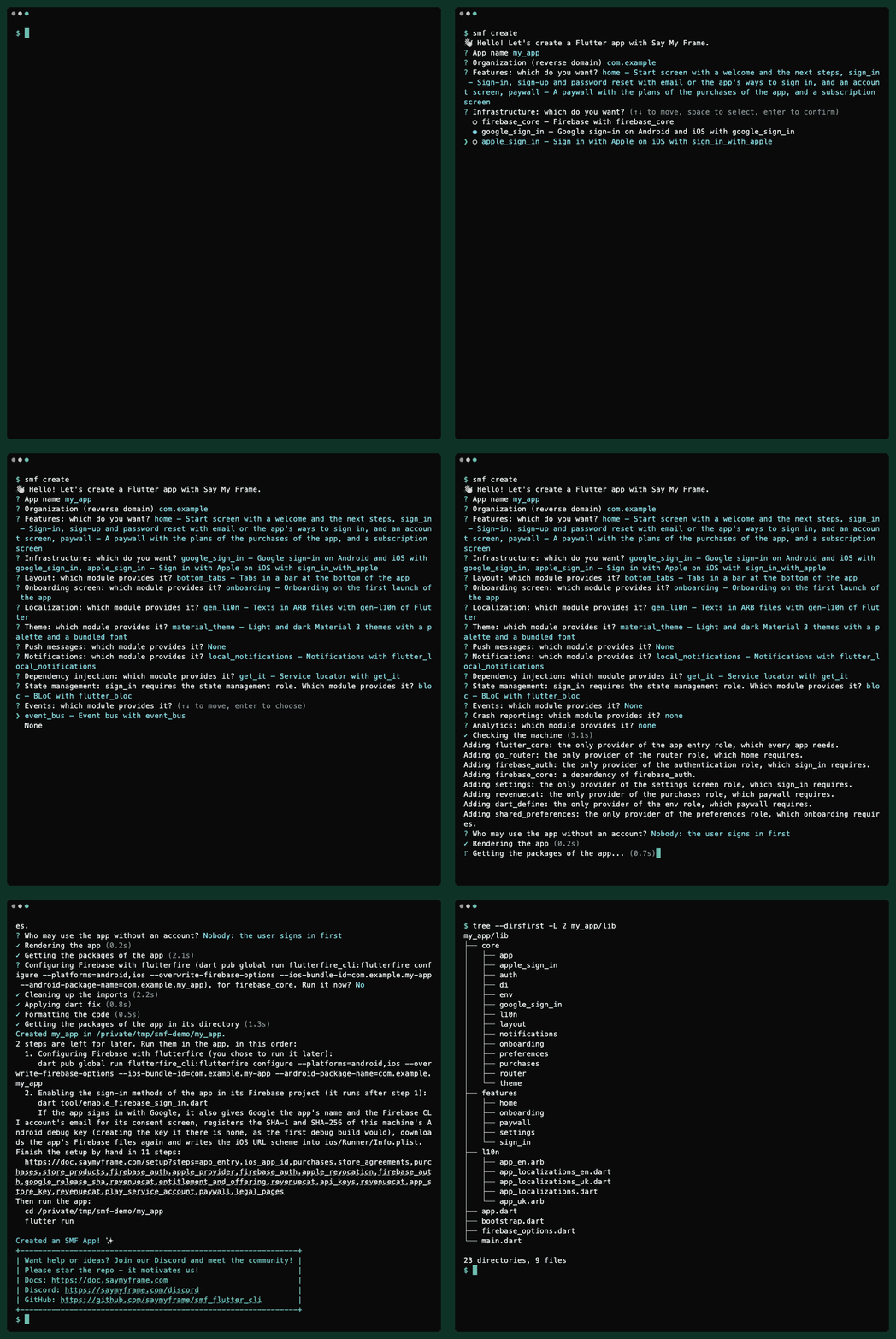
The recording answers the questions of smf create instead of passing -m. The paywall needs a provider of purchases and a place for its keys, so SMF adds revenuecat and dart_define and says why, as it does for the router and the settings screen.
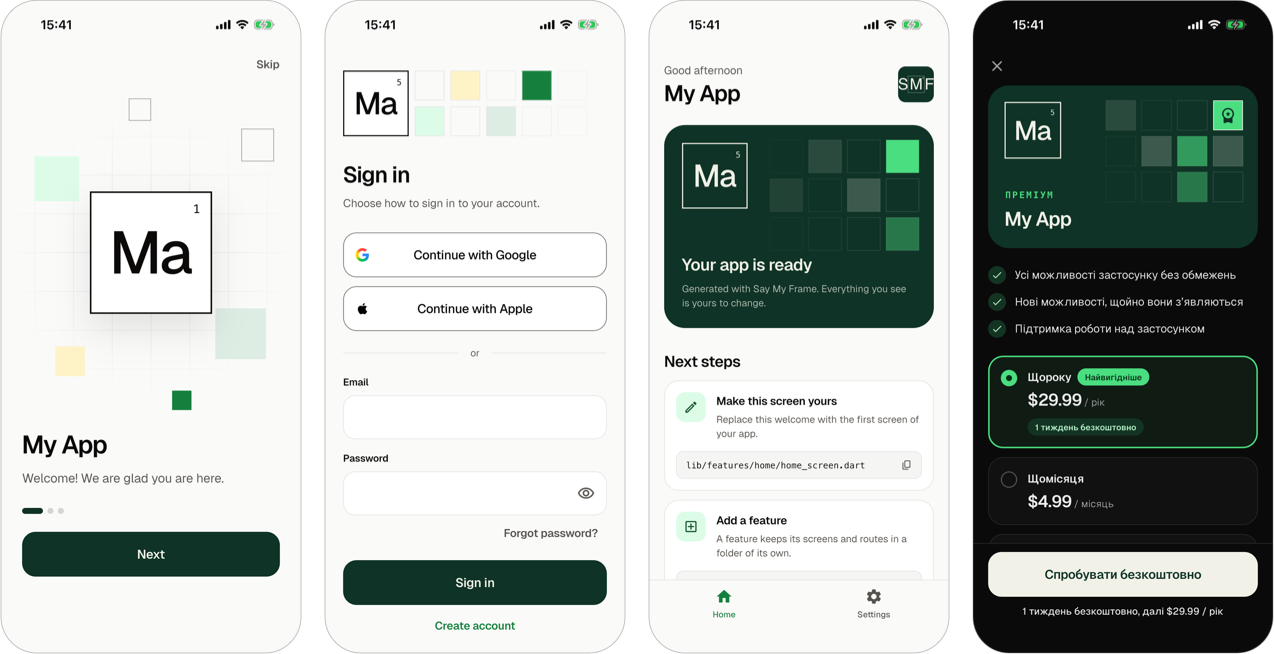
As before, what you get is a regular Flutter project. It has no SMF package in its dependencies, and SMF never touches it again.
The Flutter paywall after smf create
paywall is a feature module with two screens. The paywall at /paywall shows, from the top:
- a card in the colors of Say My Frame, with the app as a cell of the periodic table and Premium above its name, as on the start screen;
- three benefits of premium access;
- a card for each plan of the current offering, with the price that the store gives, its period and its free trial, such as
$29.99 / yearand1 week free. A yearly plan that costs less than twelve months of the monthly one gets the badge Best value, and the paywall selects it; - the button that buys the selected plan, which says Start free trial, Subscribe or Buy, and below it what the plan costs after its trial;
- the terms of the platform's store, and the links Restore purchases, Terms of Use and Privacy Policy.
The subscription screen at /paywall/subscription shows the user's plan, the day it renews, ends or ends its free trial, and a button to the store page where the user cancels it.
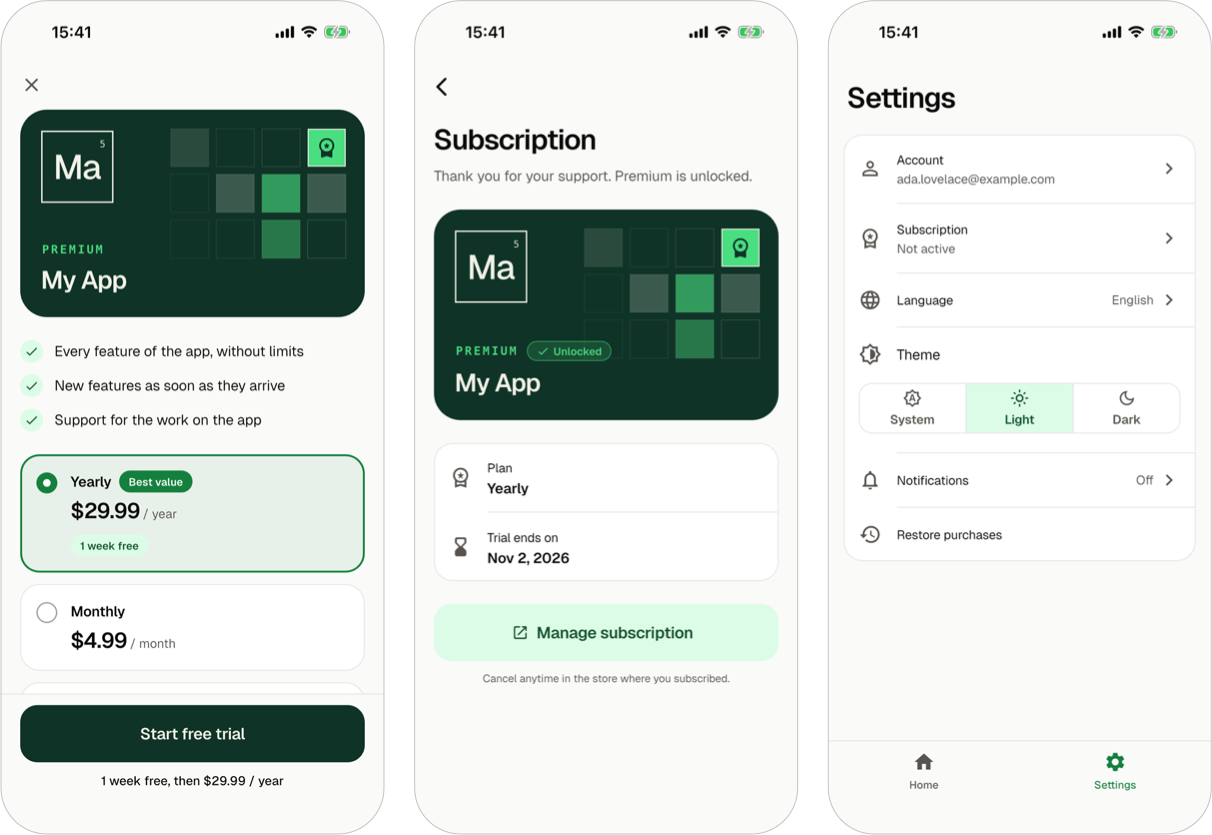
Most of what the paywall shows comes from the rules of the App Store and Google Play for a screen that sells a subscription. The full price of each period is the largest text of its card, and a yearly plan never shows its price per month, which Google Play does not allow. A plan with a trial says how long the trial lasts and what comes after it. The paywall tells how to cancel in each store's own words, and on iOS the Terms of Use link goes to Apple's standard license agreement until you give an address of your own. The close button stays in sight whenever there is a page below the paywall to go back to.
The paywall never navigates after a purchase. The route of the subscription screen asks for premium access, and a router guard stands for it. A tap on Subscription in the settings opens the paywall for a user without premium, and once the purchase goes through, the router closes the paywall and shows the subscription screen, so neither screen has to know about the other.
In an app with an onboarding, the module adds a page, Unlock premium, after the pages that ask for permissions. Its button shows the paywall over the onboarding, and Not now goes on without it. A user who already has premium doesn't see the page. The settings screen gets two rows: Subscription, which says whether premium is active, and Restore purchases, which shows below its title what it found.
Like the screens of sign-in, the paywall comes in a variant for BLoC and one for Riverpod, in both themes and both languages of the app. The paywall page of the docs has the rest.
RevenueCat keys in .env, read with --dart-define-from-file
revenuecat sells the plans of the default offering in a RevenueCat project, with purchases_flutter. Every plan unlocks the same entitlement, premium. The app needs the public API keys of the project: one for the App Store, one for Google Play, and one for RevenueCat's Test Store, where you can buy in a debug build before your products are in the stores.
These keys are the first values in SMF that you fill in after generation, so 0.7 adds a role for them. dart_define gives the app a .env file with a line for each key that its modules read. The file stays out of git, and .env.example with the same keys stays in. The app reads the values with --dart-define-from-file=.env:
flutter run --dart-define-from-file=.envAn edit of .env needs no code generation, and a fresh clone of the app builds with the empty values. The VS Code and Android Studio run configurations that SMF generates pass the argument, and in VS Code so do Run and Debug and the Testing view.
Everything in .env ends up in the app, where anyone can read it. RevenueCat's public keys are made for that. A secret key isn't, so the app refuses a key that starts with sk_.
Without a key, the app starts and runs without purchases. The paywall says that the plans are not available right now, and a debug build shows you which key is missing. RevenueCat stops a release build that is configured with a Test Store key, so the app takes that key only in a debug build.
Whose purchases they are, with sign-in and without
In an app with sign-in, the purchases follow the user of the session. Someone who buys before signing up keeps premium on the new account. After a sign-out, the next user of the device has none of those purchases, and signing in again brings them back. In an app without sign-in, the purchases belong to the device. The purchases guide shows how code reads premium access and the plans.
What RevenueCat did on real devices
Before writing the module, I ran purchases_flutter in a generated app on an iPhone simulator and an Android 12 emulator, with no key, with made-up keys, and with calls made in the wrong order:
- On iOS, any call to RevenueCat before it is configured crashes the app. On Android the same call only throws. So the generated service calls nothing before its configuration has finished, and nothing at all without a key.
- With an empty key, iOS configures anyway and sends requests that fail with 401. Android throws an error whose code is the word
error, and the helper of the plugin that reads error codes throws aFormatExceptionon it. The service reads such a code itself, so a bad configuration ends up as "not configured" with a hint. - Logging out an anonymous user, which is who uses a device without sign-in, fails in RevenueCat with code 22. The app counts it as done.
The tests of the modules run purchases_flutter over a stand-in for its platform side, which can't show whether premium access really reaches a running app. So CI checks that as well. It starts the app with every module on an Android emulator and an iOS simulator, with the Test Store key of a RevenueCat project. The app asks CI for premium access, a test grants the entitlement in that project through RevenueCat's REST API, with a secret key that never goes near the app, and the app has to show premium access that ends when the grant does. In the first runs, the whole exchange took 7 to 16 seconds.
Eighteen roles and twenty-five modules, checked in running apps
0.6 had sixteen roles and twenty-two modules. 0.7 has eighteen and twenty-five. The new roles are the purchases and the values in .env. The new modules are dart_define, revenuecat and paywall.
When I wrote this, CI generated 84 apps from the modules of the CLI and ran flutter analyze and flutter test in each. It also starts the apps with every module on an Android emulator and an iOS simulator, and grants them premium access in RevenueCat.
What SMF 0.7 can't do yet
- There are no dev and prod environments and no HTTP client yet.
- Firebase is the only provider of sign-in, analytics and crash reporting.
Where it's going
Next on my list is what an app needs before it goes to the stores: dev and prod environments, an HTTP client whose address comes from the environment, CI for the generated app, and an app icon and a splash screen. There are no dates. SMF is a side project, and I'd rather ship things when they work.
If you have a module in mind, tell me which one on Discord or in GitHub Issues.
Upgrading from 0.6
- In an app with a router,
firebase_analyticsturns off the screen views that Firebase logs by itself, so each screen is logged once and the app logs noMainActivityorFlutterViewController. A reader of the post about screen tracking with go_router pointed this out. - The README of every generated app says that Say My Frame generated it.
- The module API of
smf_contractschanged: the action of an onboarding step gets theBuildContextof the onboarding, steps have a new stageoffer, and a provider of the app entry has a socket for.gitignore. A module that adds onboarding steps or provides the app entry needs an update. - Apps generated by 0.6 stay as they are.
The full list is in the release notes of SMF 0.7.0 on GitHub.
Try the Flutter paywall with smf create
dart pub global activate smf_flutter_cli
smf create
SMF generates Android and iOS apps for Flutter 3.44 or newer and Dart 3.12 or newer, and it is tested on macOS, Linux and Windows. The documentation starts with installation and your first app, the paywall page covers the screens and the store rules, and the code is on GitHub. Stars there are welcome, but only if you actually like it.