
A Flutter app in one command
Pick what the app needs, such as a router, tabs at the bottom, sign-in, notifications, dependency injection, a state manager and Firebase. smf create generates a Flutter project in which these parts already work together.
The project does not depend on SMF at run time, so its code is yours from the first commit.
dart pub global activate smf_flutter_cli$ smf create my_app --org com.example -m home,bottom_tabs,get_it,event_bus --explainApp my_app of com.example Android application id: com.example.my_app iOS bundle id: com.example.my-app Directory: /Users/you/projects/my_app Modules home: requested bottom_tabs: requested get_it: requested event_bus: requested flutter_core: the only provider of the app entry role, which every app needs go_router: the only provider of the router role, which home requires Roles Layout: bottom_tabs Dependency injection: get_it Events: event_bus App entry: flutter_core Router: go_router--explain prints the plan and stops before it writes anything. This is the start of its report, from the documentation.
SMF generates apps for Flutter 3.44 or newer and Dart 3.12 or newer. It is tested on macOS, Linux and Windows.
How it works
The elements of an app
SMF builds an app from roles, such as the router or dependency injection, and modules fill them. Pick a module for each role the app needs and leave out the rest. A module that needs a role works with every module that provides it, so you can swap one for another and the app still compiles.
Choose the modules
Pick the features and a module for each role the app needs, in the questions of
smf createor with-m.-m home,
bottom_tabs, get_it, bloc Run
smf createSMF adds the modules that your choice needs, generates the project, and applies
dart fixanddart format.smf create my_app -m home,
bottom_tabs, get_it, bloc Run the app
You get a regular Flutter project in which the parts already work together. Start it with
flutter run.cd my_app && flutter run
App entry
Every app has exactly one.
The Flutter project that every app starts from: main(), the start-up code in bootstrap(), the root widget, and the Android and iOS projects of flutter create. Other modules add their start-up code and native settings to it.
Your code uses
bootstrap()App
Modules that provide it
- flutter_core
The Flutter project for Android and iOS,
main(), the start-up and the root widget. Every app has it.
How to choose
There is nothing to choose: smf create adds flutter_core to every app by itself.
Router
An app has none or one.
The routes of the screens that features declare, and a typed way to reach them. A screen navigates with context.nav.home.home().go() rather than through the router, so its code works with any router. With a layout, the router also builds the main navigation.
Your code uses
context.navAppRouter
Modules that provide it
- go_router
Routes and a typed navigation facade, with go_router.
How to choose
Choose it with -m go_router or in the questions of smf create. A feature or a layout needs a router, so SMF adds go_router by itself while it is the only router.
Layout
An app has none or one.
The main navigation of the app. With bottom_tabs, the routes that features mark as destinations become tabs in a bar at the bottom, and each tab keeps its own stack. With one destination, the bar stays hidden.
Your code uses
DestinationAppShell
Modules that provide it
- bottom_tabs
The main navigation as tabs in a bar at the bottom.
How to choose
smf create asks about the layout before the router, and offers None as well. A layout needs a router, which smf create adds when only one module provides it.
State management
An app has none or one.
The library that holds the state of screens. A feature that keeps state brings its Cubits or providers in a variant for each library, so the same feature works with either. Screens talk only to their state, never to the DI container.
Your code uses
context.readwith blocrefwith riverpod
Modules that provide it
How to choose
An app has one state manager or none. Asking for two, as in -m bloc,riverpod, stops smf create with an error that names both.
Dependency injection
An app has none or one.
A container for the services of the app. The modules declare their services, and the provider registers them before the first frame. A feature takes its services with resolve<T>() in its composition file, and the rest of the code gets them as parameters.
Your code uses
resolve<T>()ServiceLocator
Modules that provide it
- get_it
Dependency injection: the services of the modules, registered in get_it.
How to choose
Choose it with -m get_it or in the questions. When a module you chose needs dependency injection, smf create adds get_it by itself.
Events
An app has none or one.
A service through which parts of the app that do not know each other exchange events. fire(event) sends an event, and on<T>() streams the events of a type.
Your code uses
CommunicationServiceAppEvent
Crash reporting
An app can have any number.
Reports the errors that the app does not handle, and those its code reports through CrashReporter. With several modules, the reporter of the app forwards every report to all of them.
Your code uses
CrashReporterinstallCrashReporting()
Modules that provide it
- firebase_crashlytics
Crash reporting with Firebase Crashlytics.
How to choose
An app can have any number of them, or none. firebase_crashlytics brings firebase_core, which sets up Firebase.
Analytics
An app can have any number.
Records what users do through AnalyticsService and, in an app with a router, a screen view for each screen the user sees. With several modules, the service forwards every call to all of them.
Your code uses
AnalyticsServicelogEvent
Modules that provide it
- firebase_analytics
Analytics with Firebase Analytics and, with a router, a screen view for each screen the user sees.
How to choose
An app can have any number of them, or none. firebase_analytics brings firebase_core, which sets up Firebase.
The tiles are some of the roles of an app. Features, such as the start screen home or the screens of sign_in, and infrastructure, such as firebase_core, provide no role. The documentation has every module, with the role that it fills.All modules
The app
What the app looks like
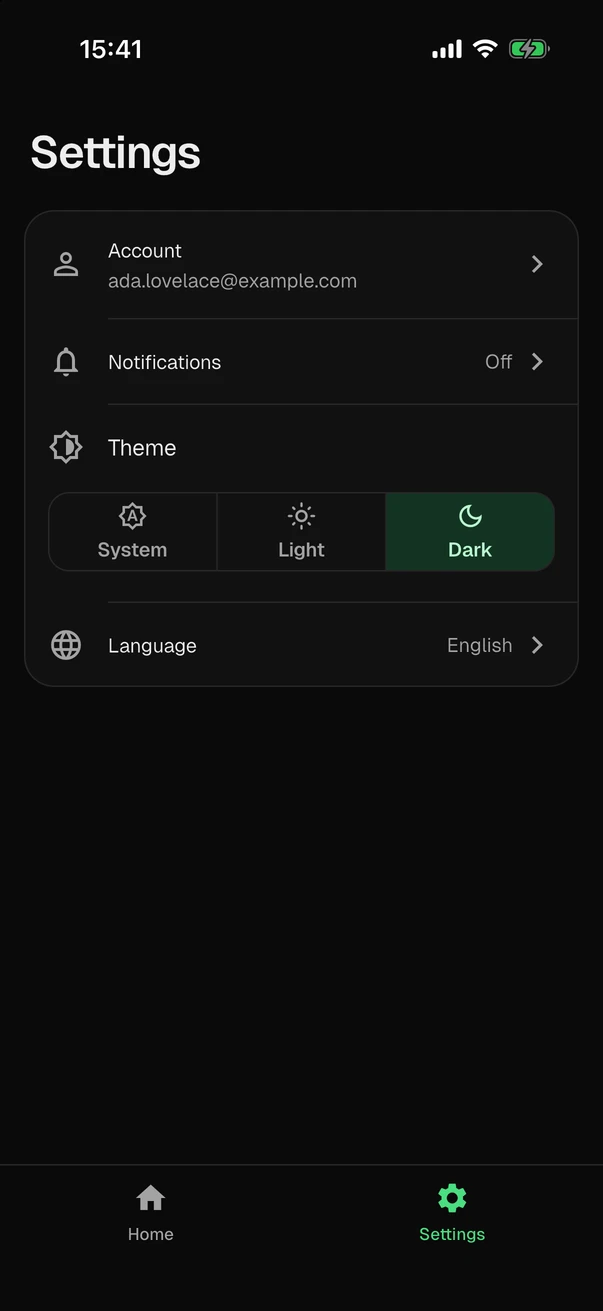
The video and the stills show an app as smf create generates it, before anyone edits a line. It opens with an onboarding that asks for the permission to show notifications, then asks the user to sign in with Google, with Apple or with an email address, or to create an account. Past that are a start screen that lists what to do next, a screen of the account, and settings that change the notifications, the theme and the language. It comes in a light and a dark theme, in English and Ukrainian.
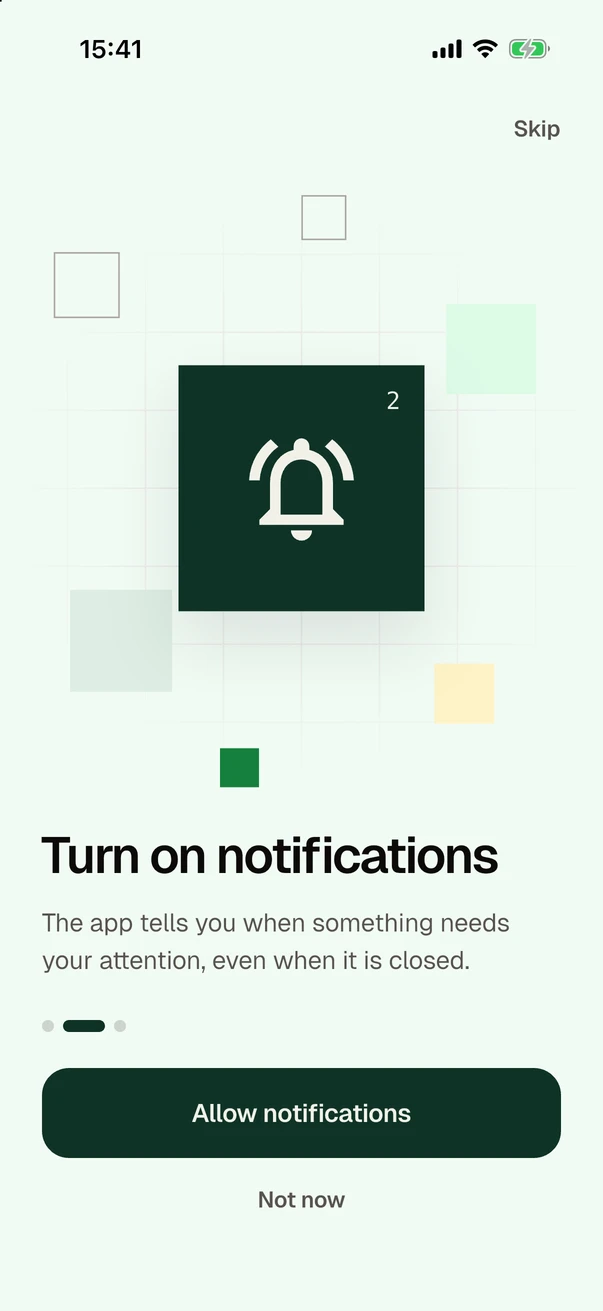
The onboarding asks for the permission to show notifications. 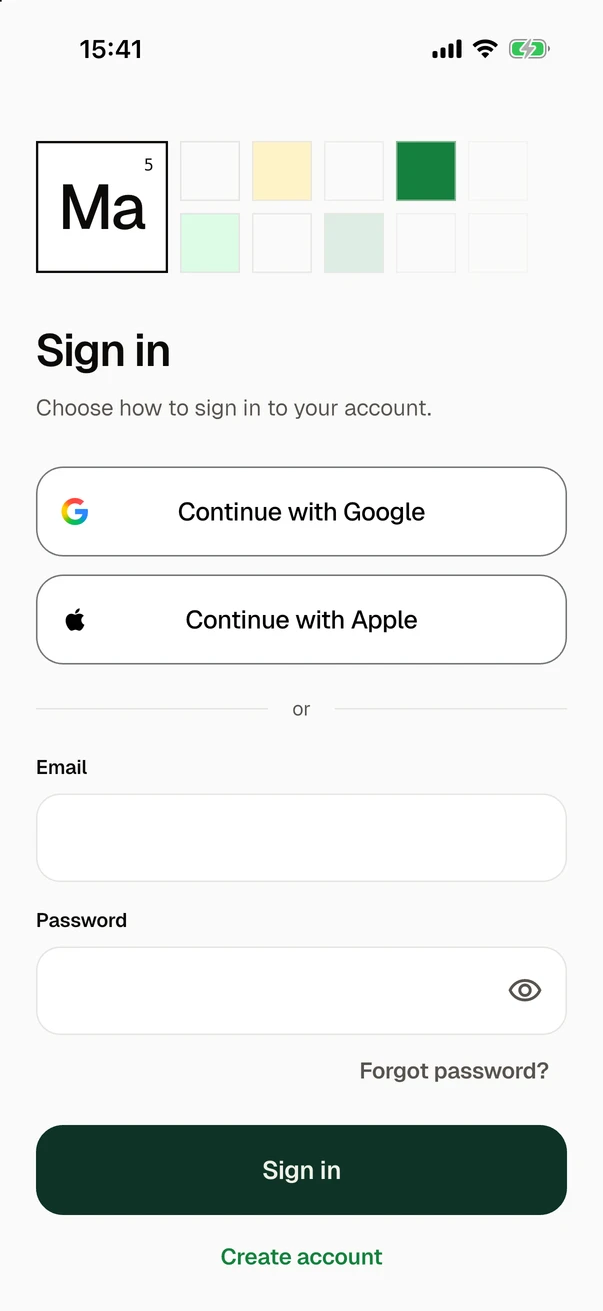
Then the app asks the user to sign in. 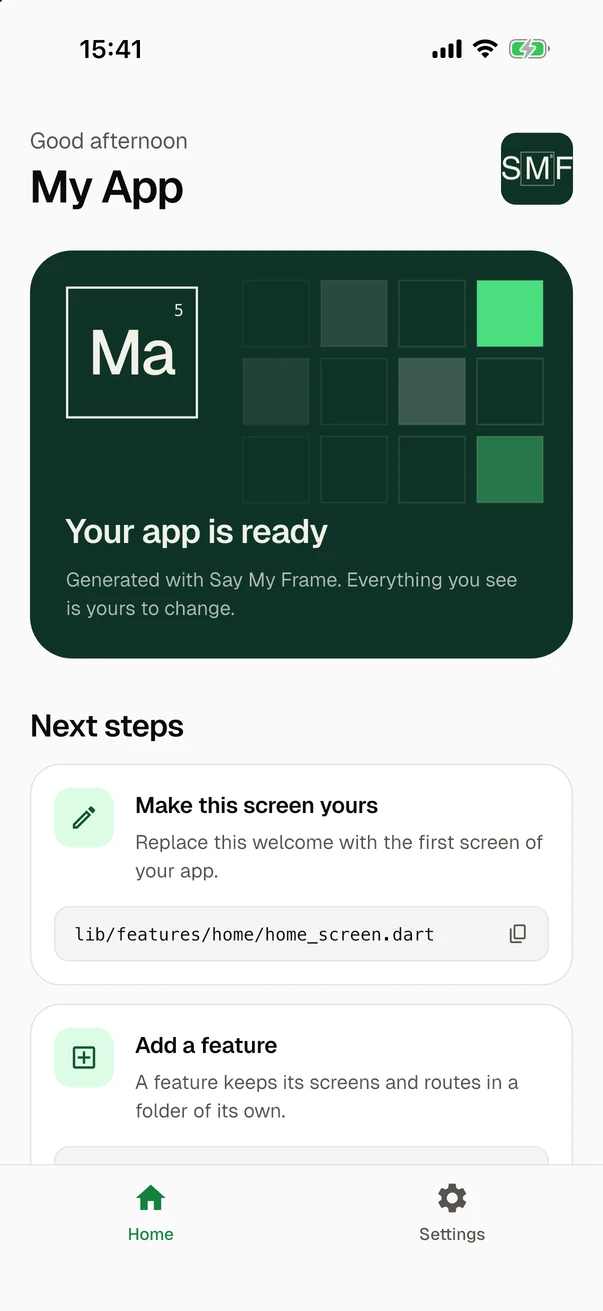
With an account, the user reaches the start screen. 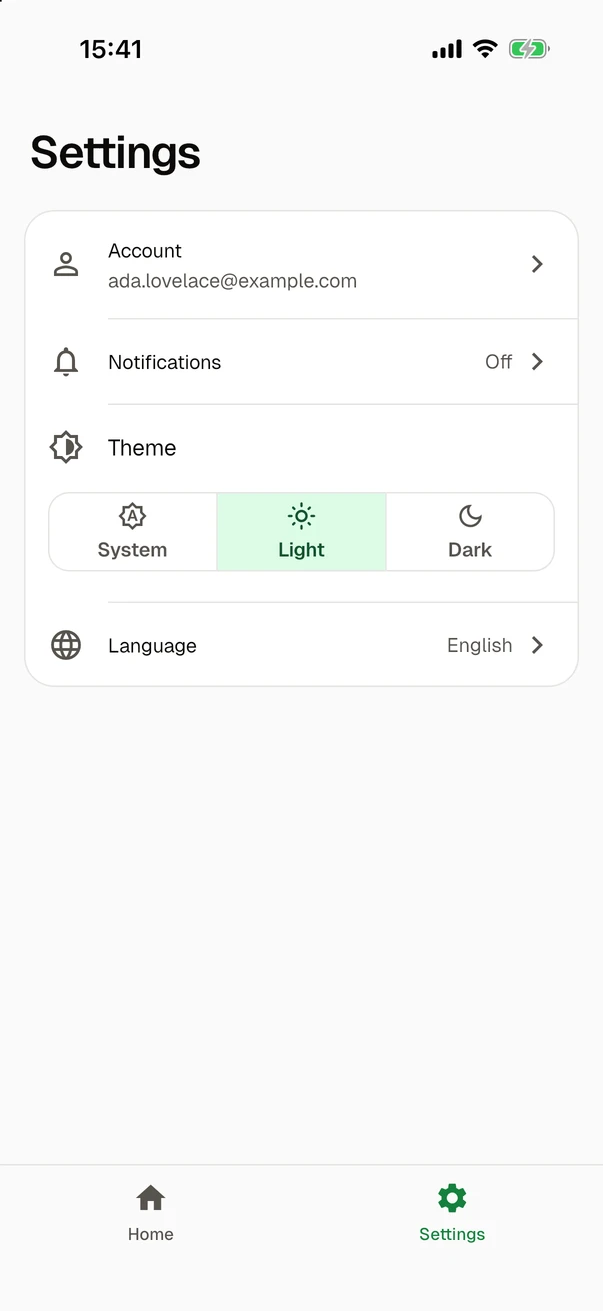
The settings have the account, the notifications, the theme and the language. 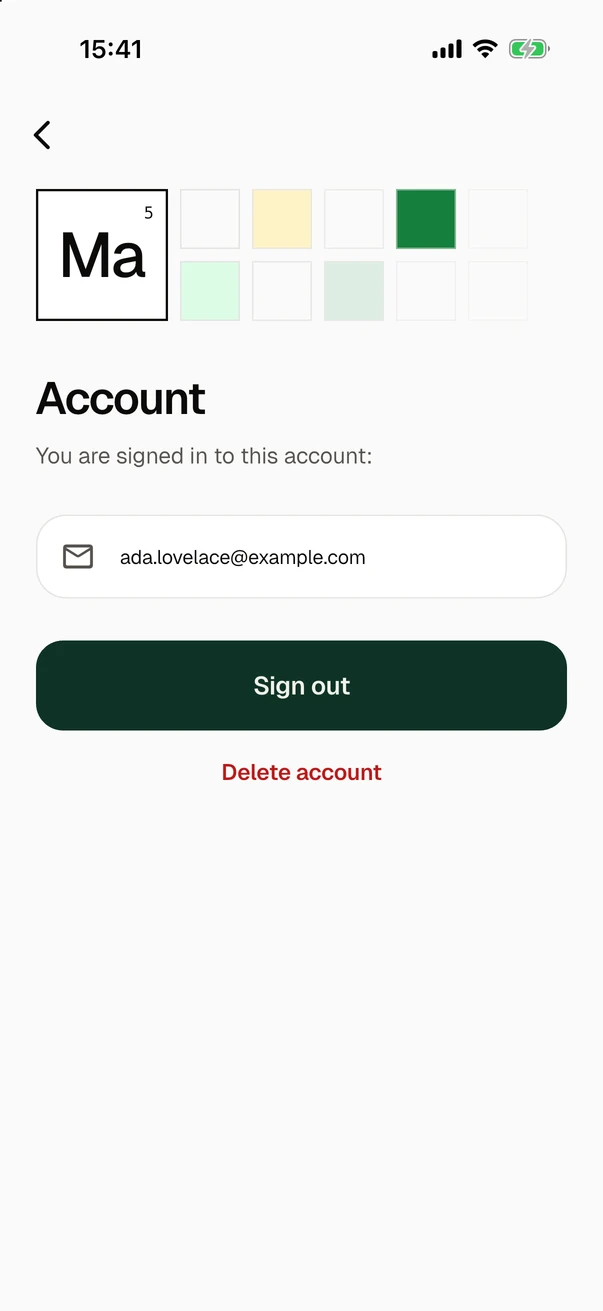
The screen of the account signs out or deletes the account. 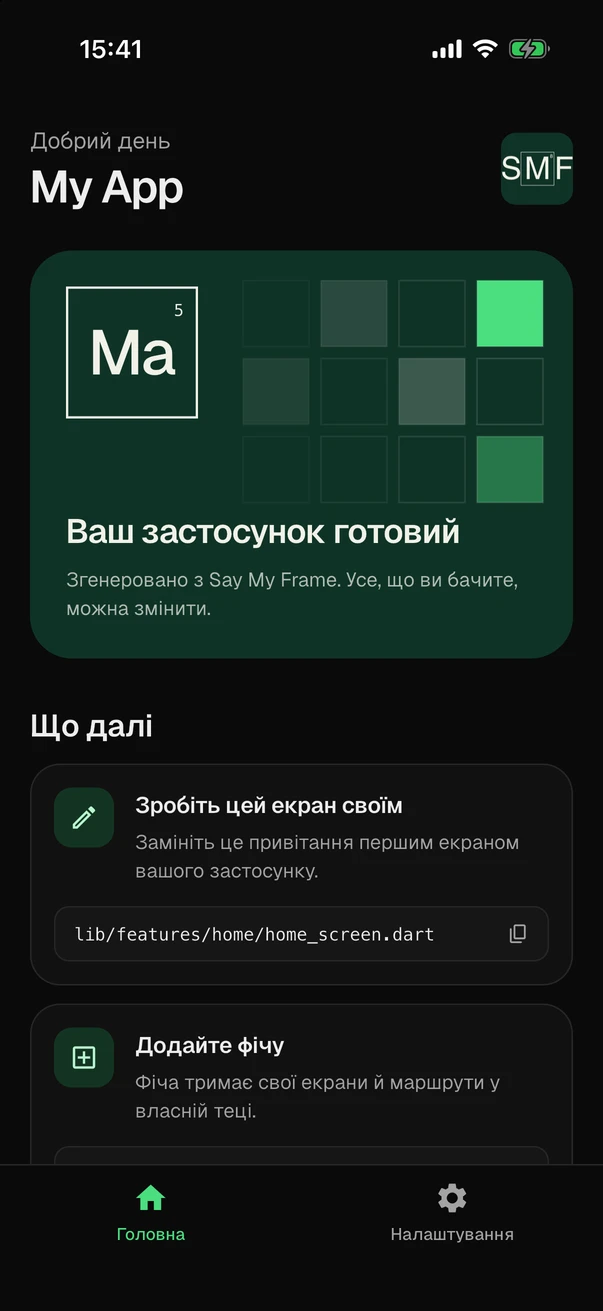
The start screen again, dark and in Ukrainian.
The command for this app
smf create my_app -m home,onboarding, sign_in and home are the screens. google_sign_in and apple_sign_in put the buttons of Google and Apple on the sign-in, and local_notifications brings the notifications with their page in the onboarding. bottom_tabs is the bar with the tabs, material_theme brings the two themes and gen_l10n the texts in both languages. get_it is dependency injection and bloc the state manager. smf create adds what these need: go_router, the settings screen, shared_preferences and, for the accounts, firebase_auth with firebase_core.
The accounts are in Firebase Authentication, so this app needs a Firebase project before it starts. In a terminal, smf create asks whether to register the app in your project, and then whether to enable sign-in with an email address and with Google there. Sign in with Apple needs a few steps by hand, and smf create ends with a link to a guide for them. Until the app is registered, it compiles but stops at start-up.
The code
Every file has one author
Some files come from a module and others from a role, whichever module provides it. That split lets modules replace each other.
- Routes and typed navigation
- With a router, every screen of a feature has a route. Screens navigate with
context.navrather than through go_router, so their code works with any router. - Navigation
- Tabs that keep their stacks
- With
bottom_tabs, the routes that features mark as destinations become the tabs of a bar at the bottom, and each tab keeps its own stack. - bottom_tabs
- Services behind the state
- With
get_it, the app registers the services of the modules before its first frame. Screens reach them only through their state, a Cubit or a Riverpod provider. - Services and state
- Start-up in the right order
bootstrap()runs the start-up code of the modules in phases, so Firebase and crash reporting are ready before the services of the app.- Start-up
- Firebase and its setup
- SMF checks for the Firebase CLI, a login and the FlutterFire CLI, and offers to set up what it can. After generation it asks whether to run
flutterfire configure. - Firebase
- Code you own
- SMF applies
dart fixanddart formatto the new app. The app has no SMF package in its dependencies, and nothing in it has to be generated again. - It is your code now
my_app · home, bottom_tabs, get_it, event_bus
| File | Written by |
|---|---|
| my_app/ | |
| AGENTS.md | app entry role |
| CLAUDE.md | app entry role |
| README.md | flutter_core |
| analysis_options.yaml | flutter_core |
| pubspec.yaml | flutter_core |
| android/ | flutter_core |
| ios/ | flutter_core |
| lib/ | |
| main.dart | flutter_core |
| bootstrap.dart | flutter_core |
| app.dart | flutter_core |
| core/ | |
| app/status_bar_icons.dart | app entry role |
| di/service_locator.dart | DI role |
| di/dependencies.dart | get_it |
| events/communication_service.dart | events role |
| events/event_bus_communication_service.dart | event_bus |
| layout/destination.dart | layout role |
| layout/app_shell.dart | bottom_tabs |
| router/app_router.dart | router role |
| router/navigation.dart | router role |
| router/app_router_factory.dart | go_router |
| features/home/home_screen.dart | home |
| features/home/assets/ | home |
| test/ | app entry role |
context.nav.home.home().go();For teams
For teams and module authors
SMF rests on one principle: modules do not know each other. Roles, sockets and the checks that smf create runs keep it that way, so a team can swap the provider of a role or add modules of its own.
- Modules depend on roles
- A module names only the modules it depends on, as the Firebase modules name
firebase_core. For everything else it names a role, such as a router or a DI container, and whichever module the user picked provides it. A screen needs a router, and analytics follows the screens of whichever router the app has. - The module model
- Sockets in shared files
- A module does not edit files. Shared files such as
bootstrap.darthave sockets, named places where modules put code, andsmf createorders and merges what the modules contribute. - Sockets and contributions
- Modules of your own
- A module is an ordinary Dart package built on
smf_contracts. A command of your own, built onsmf_flutter_cli, offers your modules next to the built-in ones, with every option ofsmf create. - Extending SMF
- A contract harness
- The harness in
smf_pipelinerenders every app that matters for a module in memory and checks it against the rules of the module model. The built-in modules test themselves with it. - Test a module
- Combinations checked in CI
- CI generates apps from the modules in many combinations, each module with each provider of the roles it requires and every module together, and runs
flutter analyzeon each. - Module independence
- Ready for scripts
- With
--no-inputa run asks nothing, and with--strictit stops rather than leave a module out.--explainprints the plan without writing a file, and exit codes tell a script what happened. - Scripts and CI
final class HomeModule extends SmfModule {
  const HomeModule();

  static const id = ModuleId('home');

  @override
  ModuleDescriptor get descriptor => const ModuleDescriptor(
        id: id,
        description: 'Start screen with the name of the app',
        kind: ModuleKinds.feature,
      );

  @override
  List<Contribution> contribute(ModuleContext context) => [
        BrickContribution(homeBundle),
        routerRole.data(const RoutesData([/* the route of the screen */])),
      ];
}final harness = ContractHarness(
ModuleRegistry(const [
FlutterCoreModule(),
GoRouterModule(),
GetItModule(),
BlocModule(),
RiverpodModule(),
CounterModule(),
]),
);
final results = await harness.checkAll();
for (final result in results) {
expect(result.errors, isEmpty, reason: '${result.contractCase}');
}Free and open source
SMF is developed in the open under the Apache License 2.0. Bug reports and ideas go to GitHub Issues, and questions are welcome on Discord.
Release notes by email
Get an email when SMF or its modules have a new release.
We use Resend. You can unsubscribe at any time.
Contact
Ask questions on Discord, and report bugs or ideas on GitHub. For anything else, write to us here.