7 min read
SMF 0.6: Flutter push notifications, local notifications and sign-in with Google and Apple
SMF 0.6 generates Flutter push notifications with Firebase Cloud Messaging, local notifications, sign-in with Google and Apple, and a guide for manual setup.
By Yevhen Beshkarov
- release
- firebase
- ios
Say My Frame (SMF) generates Flutter apps from independent modules. Version 0.6 is out on pub.dev. It adds Flutter push notifications with Firebase Cloud Messaging, local notifications, and sign-in with Google and Apple. At the end of the post about 0.5 these were next on my list. Some of the setup lives in the Apple Developer account and the Firebase console, where no command can reach, so 0.6 also comes with a guide for those steps, click by click.
dart pub global activate smf_flutter_cli
smf create my_app -m home,onboarding,sign_in,google_sign_in,apple_sign_in,firebase_messaging,bottom_tabs,material_theme,gen_l10n,get_it,bloc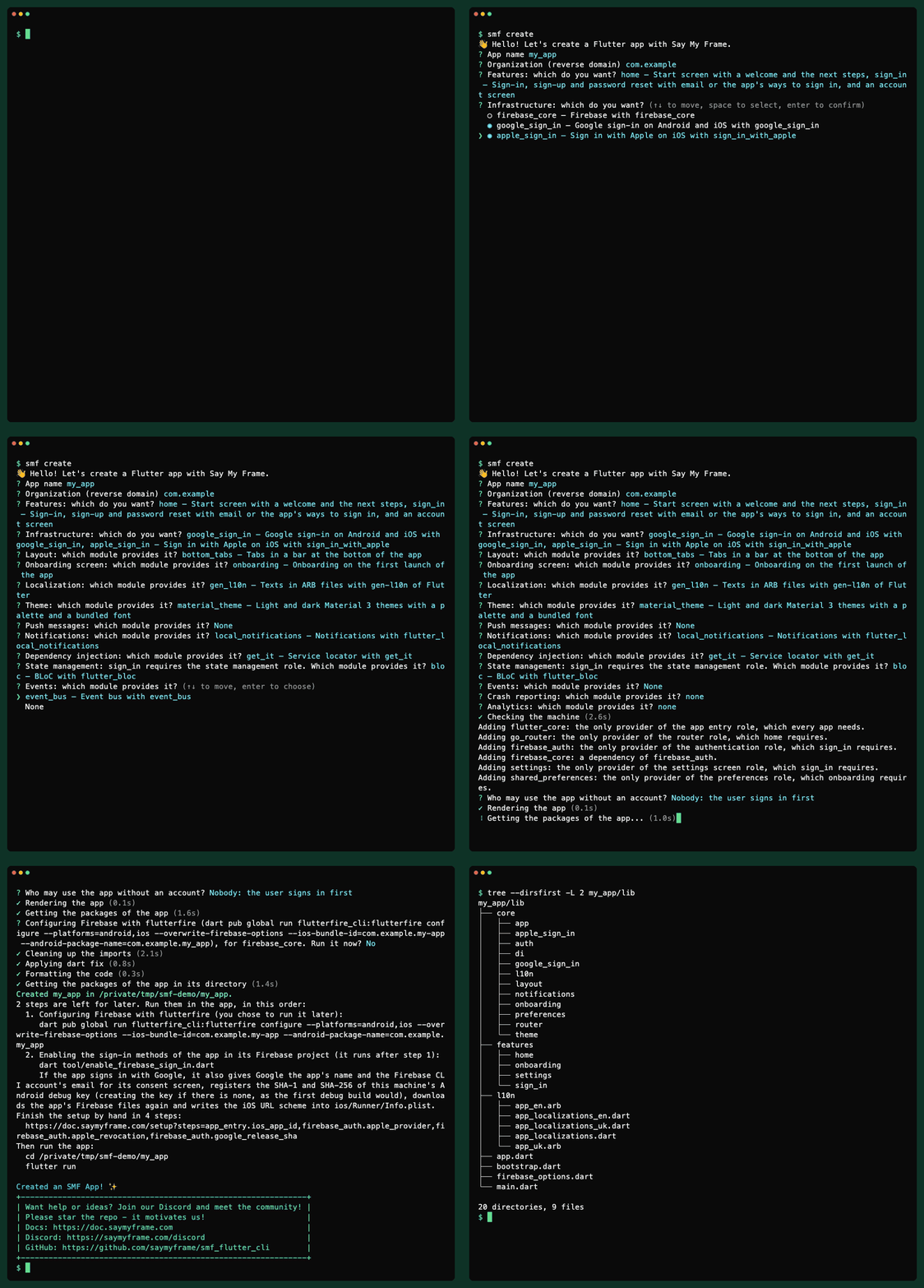
The recording answers the questions of smf create instead of passing -m. It picks local notifications and leaves push messages out, so the app needs no APNs key. Either way, SMF adds what the chosen modules need and says why.
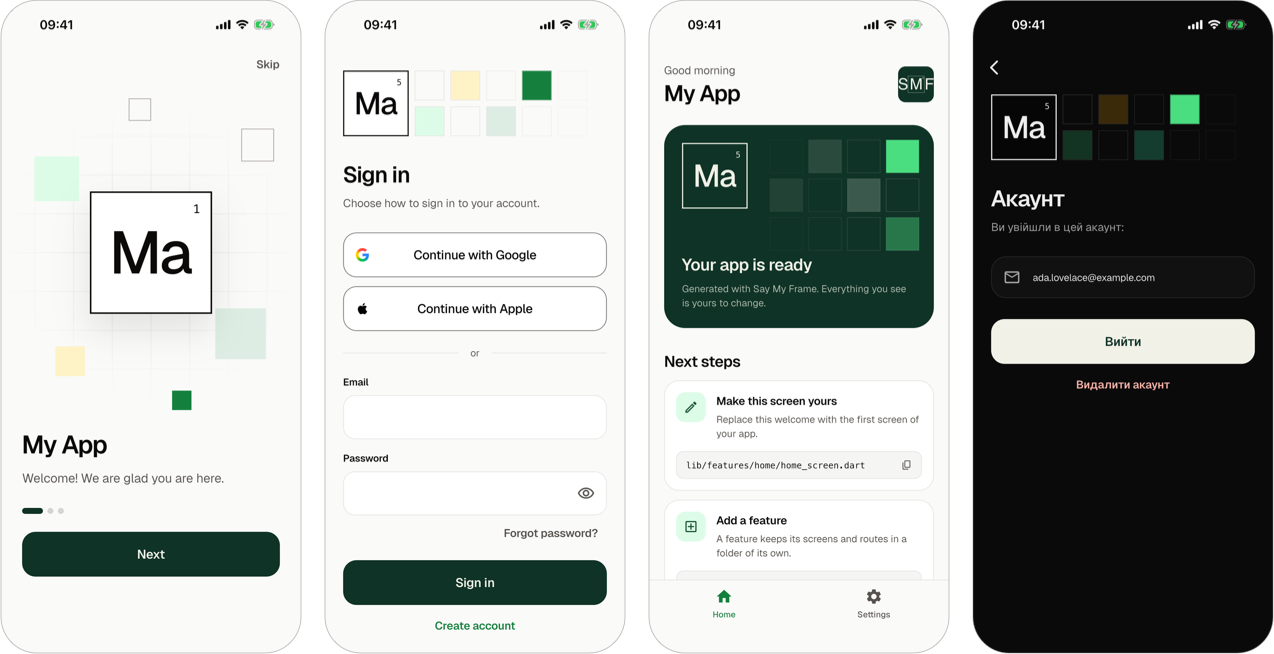
As before, what you get is a regular Flutter project. It has no SMF package in its dependencies, and SMF never touches it again.
Flutter push notifications and local notifications after smf create
Two new modules handle notifications, each for a role of its own:
local_notificationsshows a notification now or at about a time to come, on flutter_local_notifications. It tells the app of each tap, including the tap that launched the app.firebase_messaginggives the app the address of the device for its backend, which is the registration token of Firebase Cloud Messaging. It also gives the app the push messages that arrive there and the taps on them. A message that arrives while the app is open shows as a notification too.
Push messages lean on the notifications for the permission and for showing a message while the app is open, so firebase_messaging brings local_notifications with it. An app can have local notifications without push messages, and then it needs no Firebase project.
The app asks for nothing when it starts. In an app with an onboarding, one page of it asks for the permission to show notifications. The settings screen gets a row that shows On or Off, asks while the app hasn't asked yet, and opens the settings of the system after that. On Android 12 and older, where apps get the permission without asking, the onboarding skips that page.
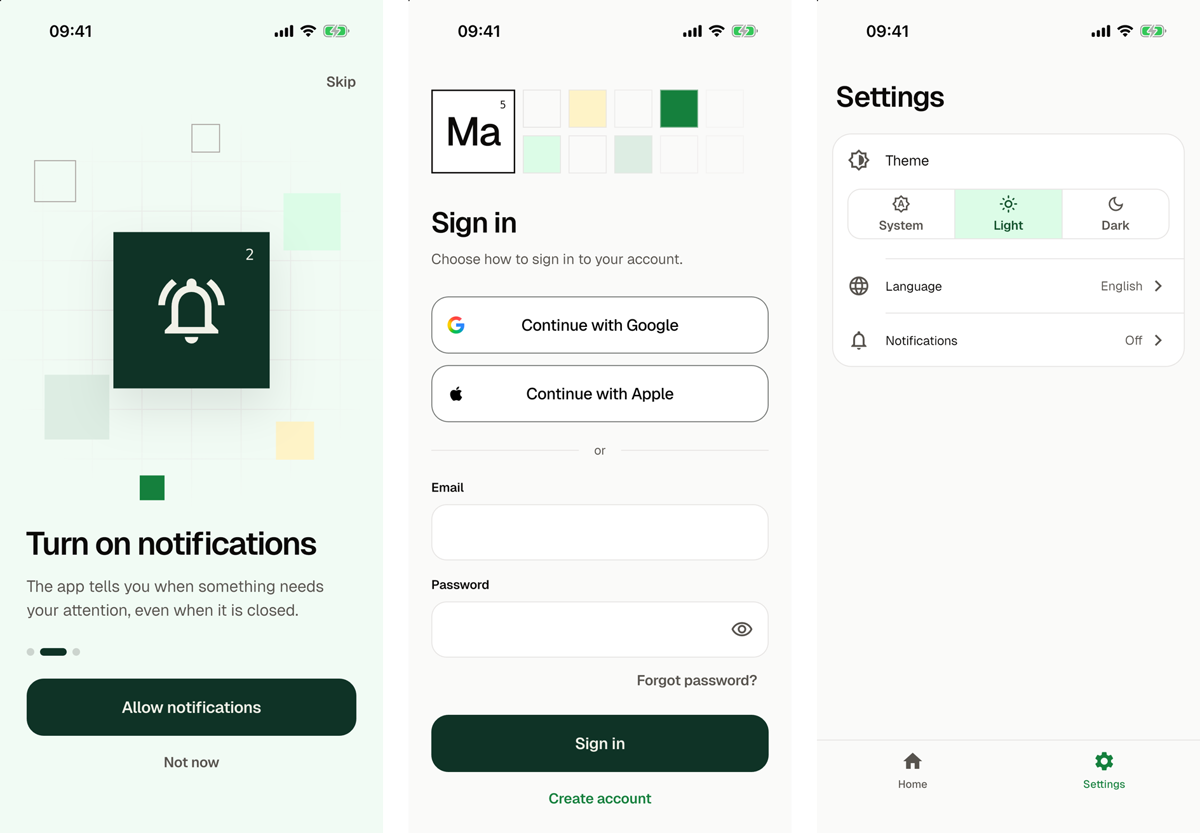
The notifications guide shows how code schedules a notification, reads the address and listens to messages and taps.
Sign-in with Google and Apple in Flutter
google_sign_in adds sign-in with a Google account on Android and iOS, and apple_sign_in adds Sign in with Apple on iOS, so on Android its button doesn't show. The sign-in screen of sign_in shows "Continue with Google" and "Continue with Apple" above the form with the email address, in the theme and in both languages of the app. Firebase Authentication signs the user in with these credentials, links them to an account, and deletes such an account.
Two rules of the App Store shaped this:
- An iOS app with Google sign-in also needs a way to sign in that the App Store takes as its equivalent, such as Sign in with Apple (Guideline 4.8).
smf createwarns of an app with Google and without Apple. - An app with Sign in with Apple revokes the tokens of Apple when the user deletes the account (Guideline 5.1.1(v)). The generated app asks Apple again before the deletion, and Firebase revokes the tokens.
After flutterfire configure, smf create offers to run a script that enables Google in the Firebase project, registers the SHA-1 and SHA-256 of your debug key and writes the URL scheme of the iOS app. Apple has no such command. The sign-in guide covers both ways to sign in.
The steps you do by hand, click by click
Some setup can't be done from a terminal:
- the App ID of a paid Apple team, which push messages and Sign in with Apple need, since a free team can't sign the app with them;
- the APNs key that Firebase needs to send messages to iPhones;
- the Apple provider and its key in Firebase;
- the SHA of your release keys;
- Google Analytics in the Firebase project.
I checked for APIs before writing a guide. Firebase takes an APNs key only in its console, and the API of App Store Connect can't create such a key either.
So smf create ends with one line that says how many steps your app needs, and one link:
Finish the setup by hand in 5 steps:
  https://doc.saymyframe.com/setup?steps=app_entry.ios_app_id,firebase_auth.apple_provider,firebase_auth.apple_revocation,firebase_auth.google_release_sha,firebase_messaging.apns_key
The page behind the link shows only those steps, in their order, with screenshots of the Apple Developer account, the Firebase console and Xcode. Each step has a checkbox, so you can come back later and see where you stopped. The README of the app lists the same steps in its section "Finish the setup". In terminals that support it, the link is clickable.
What Firebase Cloud Messaging and Apple did on real devices
The tests of the modules run the real Firebase packages over a stand-in for their platform side. Before the release I went through push messages, notifications and sign-in by hand on an iPhone simulator, on Android emulators with Android 12 and 17, and against a real Firebase project. A few things there were not what I expected:
- On the first start, the iPhone simulator had no address for about 13 seconds. The app picks it up when it arrives, so code that sends the address to a backend listens for it instead of reading it once.
- An Android emulator that I restored from a snapshot received no messages at all until a cold boot. Nothing was wrong with the app.
- On iOS, firebase_messaging also answers when a local notification is about to show. Unless the app sets the options of foreground notifications, that answer hides the notification while the app is open. The generated service sets them, so a notification shows once.
- Deleting an account that signed in with Apple, before the key of Apple was in Firebase, failed with "Code flow is not enabled for Apple". The generated app tells the user that this is not available, keeps the account, and shows you the fix in debug mode. With the key in place, the account was deleted.
One more problem broke every release build on Android, and it had nothing to do with notifications. shared_preferences_android 2.5.0 came out during this work, and with it a release build crashed before its first frame. I wrote a separate post about that crash. Since then, CI also starts a release build on an Android emulator.
Sixteen roles and twenty-two modules, checked in running apps
0.5 had thirteen roles and eighteen modules. 0.6 has sixteen and twenty-two. The new roles are the notifications, the push messages and the onboarding screen, which lets modules add pages such as the one that asks for the permission. The new modules are local_notifications, firebase_messaging, google_sign_in and apple_sign_in.
When I wrote this, CI generated 59 apps from the modules of the CLI and ran flutter analyze and flutter test in each. It also configures the app with every module for a real Firebase project and starts it on an Android emulator and on an iOS simulator.
What SMF 0.6 can't do yet
- Firebase is the only provider of push messages and of sign-in.
- There is no networking and no in-app purchases yet.
Where it's going
Subscriptions with a paywall are next on my list. There are no dates. SMF is a side project, and I'd rather ship things when they work.
If you have a module in mind, tell me which one on Discord or in GitHub Issues.
Upgrading from 0.5
--strictnow stops on a warning about what the app is made of, such as a destination in an app without a main navigation. Each such warning has a code.firebase_authneeds the Firebase CLI 15.34.0 or newer. That version no longer adds a web app to a Firebase project that already has apps.- An app gets the fallback start screen only when no route can start it.
- The module API of
smf_contractschanged: modules can add code to theAppDelegate, entitlements, ways to sign in and steps by hand. A module written for 0.5 needs an update. - Apps generated by 0.5 stay as they are.
The full list is in the release notes of SMF 0.6.0 on GitHub.
Try Flutter push notifications with smf create
dart pub global activate smf_flutter_cli
smf create
SMF generates Android and iOS apps for Flutter 3.44 or newer and Dart 3.12 or newer, and it is tested on macOS, Linux and Windows. The documentation starts with installation and your first app, the notifications guide goes from the permission to push messages, and the code is on GitHub. Stars there are welcome, but only if you actually like it.