
9 min read
SMF 0.5: Flutter sign-in with an email address and a password, on Firebase Authentication
SMF 0.5 generates Flutter sign-in: email and password screens with BLoC or Riverpod, an account screen, and Firebase Authentication behind one role.
By Yevhen Beshkarov
- release
- firebase
Say My Frame (SMF) generates Flutter apps from independent modules. Version 0.5 is out on pub.dev, and it brings Flutter sign-in. An app you generate can now have screens where a user signs in with an email address and a password, creates an account or resets a password. It also gets an account screen, and Firebase Authentication keeps the accounts. The post about 0.4 ended with sign-in as the next thing on my list. This one is about what you get, what it needs from you, and what it still can't do.
dart pub global activate smf_flutter_cli
smf create my_app -m home,onboarding,sign_in,bloc,bottom_tabs,gen_l10n,material_theme
The recording answers the questions of smf create instead of passing -m, and it also picks get_it. Either way, SMF adds what the chosen modules need and says why: sign_in brings firebase_auth, firebase_core and settings with it.
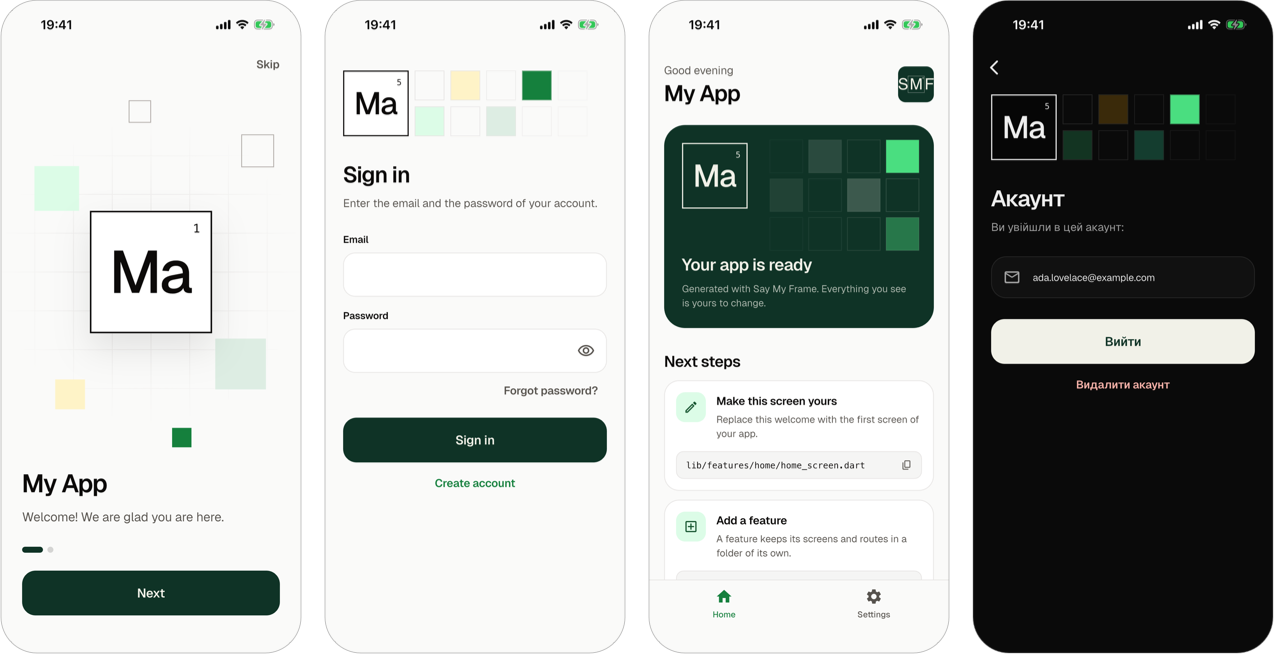
The home page of Say My Frame has a video of a walk through this app, with a sign-up.
An app with sign_in needs a Firebase project. smf create offers to run flutterfire configure once the app is generated. Until that command has run, the app compiles but stops at start-up with an UnsupportedError, because its Firebase options are still a placeholder.
As before, what you get is a regular Flutter project. It has no SMF package in its dependencies, and SMF never touches it again.
What Flutter sign-in looks like after smf create
Sign-in, sign-up, password reset and an account screen
The module sign_in adds four screens. On three of them a user signs in, creates an account, or asks for the message that resets a password. The password reset says the same whether the address has an account or not. The fourth is the account screen, where the user signs out or deletes the account after a confirmation, and the settings screen gets a row that leads to it.
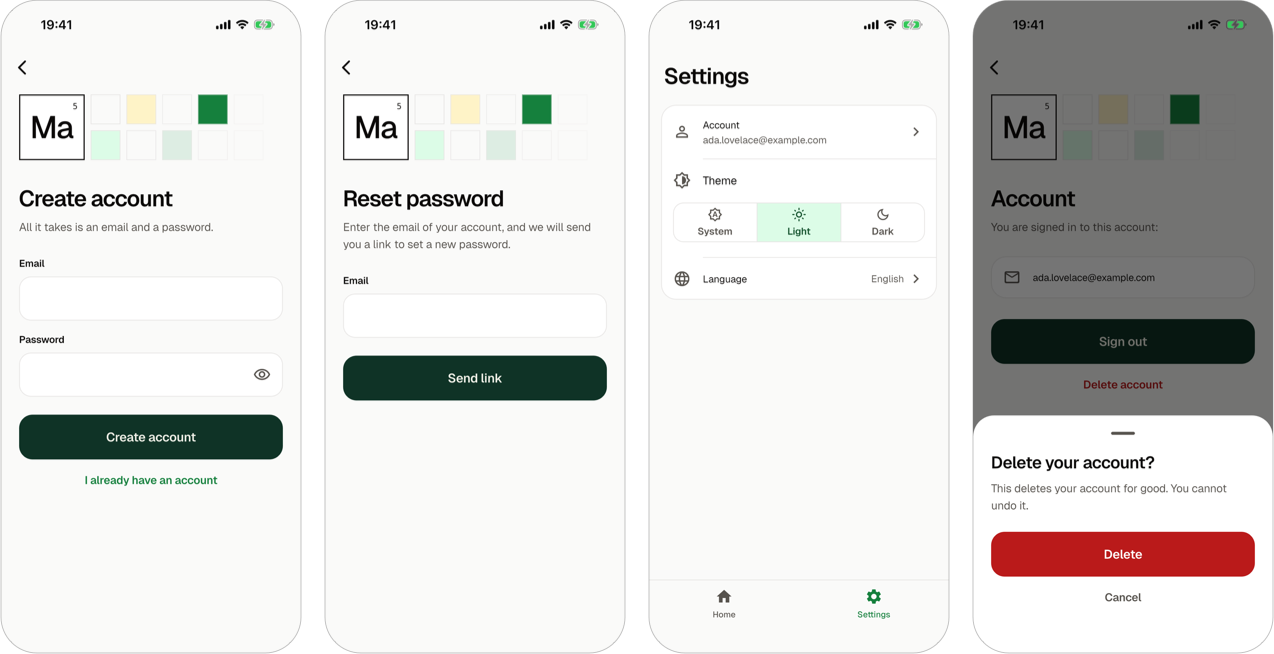
The screens take their fields, buttons and colors from the theme of the app, and their texts are in English and Ukrainian. Every reason of a failure has a text of its own, such as a wrong password or no connection. As with the onboarding in 0.4, the tests put the screens on a phone of 320 by 480 with the text at three times its size. The page of the sign-in module shows each screen.
One question: who may use the app without an account
In an app with sign-in, smf create asks one new question:
? Who may use the app without an account? (↑↓ to move, enter to choose)
❯ Nobody: the user signs in first
  Everyone: an account only where a screen needs one
  Everyone, as an anonymous user with an id from the start
--auth-mode answers it in advance with required, guest or anonymous.
- With the first answer, the sign-in shows in place of every screen until the user is signed in.
- With the second, the app is open. When the user asks for a screen that needs an account, such as the account screen, the sign-in opens over the page they are on. Back returns to that page, and after the sign-in the app shows the screen that was asked for.
- The third works the same way, and the app also signs in an anonymous user when it starts, so your code has the id of a user before anyone has an account. Signing up gives that user the account, with the same id.
The code of the screens is the same in all three, and the answer is one constant in lib/core/auth/app_session.dart. The sign-in guide describes the modes and how a screen of your own asks for an account.
The screens change the session, and the router does the rest
No screen of sign_in closes itself or navigates after a sign-in or a sign-out. The module declares two guards of the routes, and the router of the app shows the sign-in and takes it away by what they say. The route of the account screen asks for a condition:
Route(
  '/account',
  name: 'account',
  screen: ScreenRef(
    'AccountScreen',
    import: ImportRef.app('$_folder/account_screen.dart'),
  ),
  conditions: [AuthRole.account],
),
The authentication role publishes AuthRole.account, and sign_in stands for it with a guard. A feature of your own that asks for the same condition gets the same guard without naming sign_in. The module never mentions go_router either.
The router role had to learn two things for this. The flow of a guard now closes itself: once the user is signed in, the router takes the sign-in away. And a route can ask for a condition, which opens the sign-in over the screen the user is on and brings the user back. Guards of routes and conditions of routes have the rules.
BLoC or Riverpod over one look
sign_in is the first module of SMF with a variant for each state manager. The views, the forms and the texts are the same files in both. With bloc, each screen has a cubit, and with riverpod, a provider that lasts as long as the screen. Either way the state signs in through appSession, the session of the app, and knows nothing of Firebase.
Firebase Authentication behind a role
sign_in keeps no accounts. It requires the authentication role, and the module firebase_auth provides that role with Firebase Authentication.
A Firebase project needs one more thing than flutterfire configure: the ways to sign in are enabled in the project, not in the code. The module generates a script of the app that enables them with the Firebase CLI, 15.6.0 or later, and smf create offers to run it right after the configuration:
dart tool/enable_firebase_sign_in.dartIt asks first, because the Firebase CLI adds a web app named "Default Web App" to a project that has none. The Firebase console enables the same methods without it. If you answer no, or the run has no terminal, nothing went wrong, so the run doesn't warn. It lists the steps that are left, in the order to run them, after it says that the app is created. The Firebase guide has the details.
What Firebase Authentication answers on a real device
The service that talks to Firebase had tests before it met a device. They run the real firebase_auth package over a stand-in for its platform side, and they passed. Before I merged the module, I ran the same calls by hand on an Android emulator and an iPhone simulator, against a project with sign-in enabled and against one where Authentication had never been opened. The devices answered in ways the stand-in knew nothing about:
- In a project without Authentication, Android answers with an unknown error that has
CONFIGURATION_NOT_FOUNDin its message. iOS answers with an internal error whose message is the description of the error over many lines. - Android refuses an empty password with a code that says nothing of the reason. iOS answers that the password is wrong.
- An anonymous user that Android kept on the device comes back with an empty email address instead of no address.
The generated service evens these out, so a screen shows the same text on both platforms. It checks an empty field before it asks Firebase, takes an empty address for none, and gives each code of Firebase one of ten reasons that the screens have a text for. When sign-in is not enabled in the project, the user reads only that sign-in is unavailable, and in debug mode the screen adds a hint for you, with the command and the link that fix it. The page of the firebase_auth module lists every code.
Thirteen roles and eighteen modules, checked in running apps
0.4 had twelve roles and sixteen modules. 0.5 has thirteen and eighteen: the new role is authentication, and the new modules are sign_in and firebase_auth.
When I wrote this, CI generated 46 apps from the modules of the CLI and ran flutter analyze and flutter test in each. The tests of sign-in run in each of the three modes. CI also configures the app with every module for a real Firebase project, enables its sign-in methods there with the script, and starts the app on an Android emulator and on an iOS simulator.
What SMF 0.5 can't do yet
- Sign-in is with an email address and a password. There is no sign-in with Google or Apple yet.
- Firebase Authentication is the only provider of the role, so an app with
sign_inneeds a Firebase project and does not start untilflutterfire configurehas run. - The app doesn't ask a new user to confirm the email address, and it has no screen that changes the address or the password.
- Firebase may refuse to delete an account whose user signed in long ago. The screen then tells the user to sign out and sign in again.
- A screen that needs an account can't be a tab of the main navigation or the screen the app starts on.
- There is still no networking and no push notifications, and SMF still can't add a module to an app you already have.
- It generates Android and iOS apps for Flutter 3.44 or newer and Dart 3.12 or newer.
Where it's going
Sign-in with Google and Apple and push notifications are next on my list. Adding modules to an app that already exists is still on it too. There are no dates. SMF is a side project, and I'd rather ship things when they work.
If you have a module in mind, tell me which one on Discord or in GitHub Issues.
Upgrading from 0.4
- No option of
smf createchanged or went away.--auth-modeis new. - A step that you leave for later, such as
flutterfire configure, is no longer a warning. The run lists it after it says that the app is created. - In an app without a main navigation,
smf createnow warns of each destination that no screen leads to. - The module API of
smf_contractschanged: a guard now names its stage, and a module that provides the router role handles new answers of the guards. A module written for 0.4 needs an update. - Apps generated by 0.4 stay as they are.
The full list is in the release notes of SMF 0.5.0 on GitHub.
Try Flutter sign-in with smf create
dart pub global activate smf_flutter_cli
smf create
SMF is tested on macOS, Linux and Windows. The documentation starts with installation and your first app, the sign-in guide goes from the screens to the Firebase project, and the code is on GitHub. Stars there are welcome, but only if you actually like it.