7 min read
SMF 0.4: a Flutter starter app with an onboarding, settings, themes and two languages
SMF 0.4 generates a Flutter starter app with an onboarding, a settings screen, a light and a dark theme and two languages, from the modules you choose.
By Yevhen Beshkarov
- release
Say My Frame (SMF) generates Flutter apps from independent modules. Version 0.4 is out on pub.dev, and what it generates now is a Flutter starter app that you can show to someone. It opens with an onboarding, greets you on a start screen that lists what to do next, and has a settings screen where the user chooses the theme and the language. The post about 0.3 said that the app you get is a skeleton. This one is about what replaced the skeleton, what is still missing, and what I plan next.
dart pub global activate smf_flutter_cli
smf create my_app -m home,onboarding,settings,bottom_tabs,material_theme,gen_l10n,get_it,bloc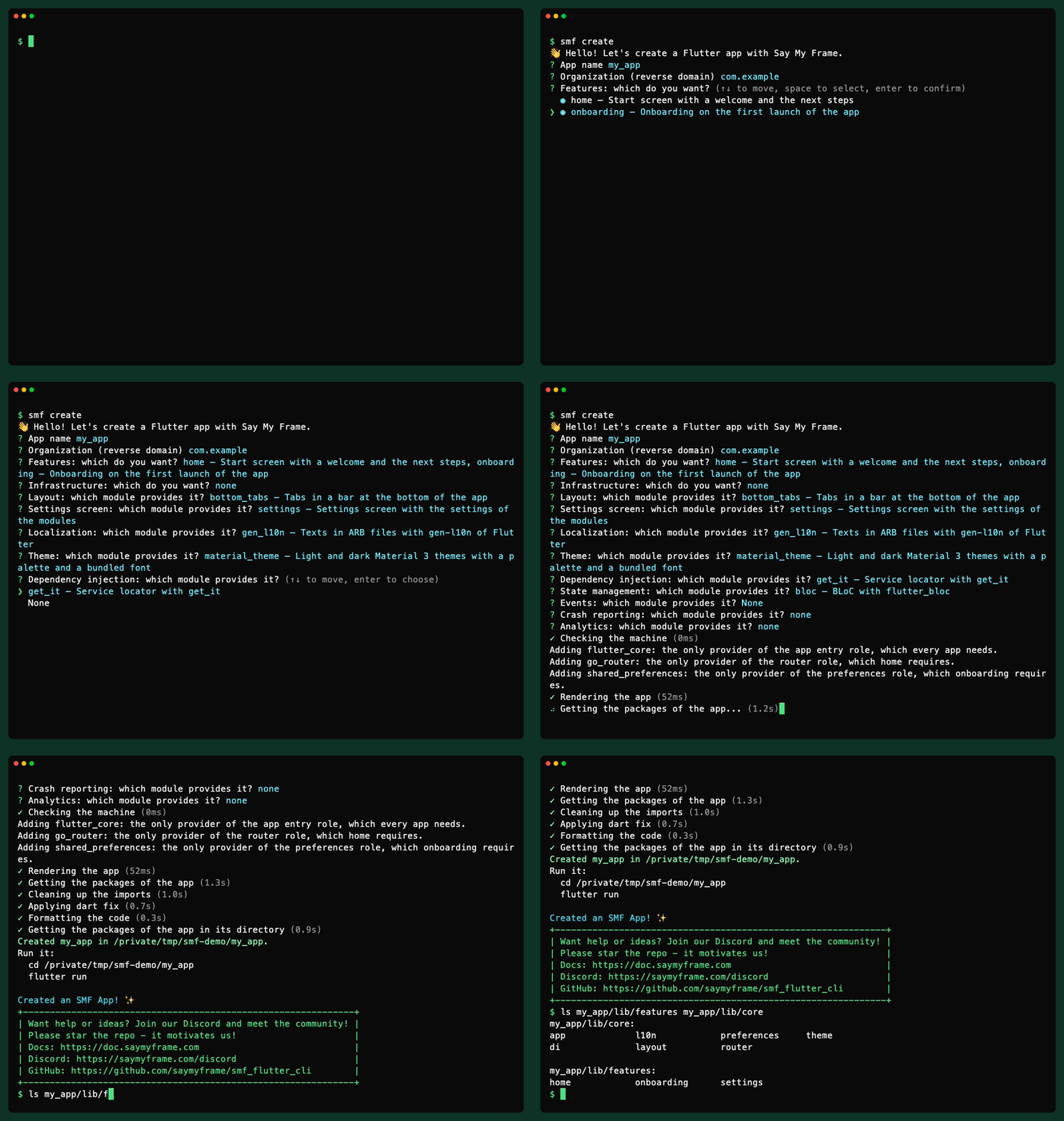
The recording answers the questions of smf create instead of passing -m. Either way, SMF adds go_router and shared_preferences by itself: the start screen needs a router, and the onboarding needs a place to remember that the user has finished it.
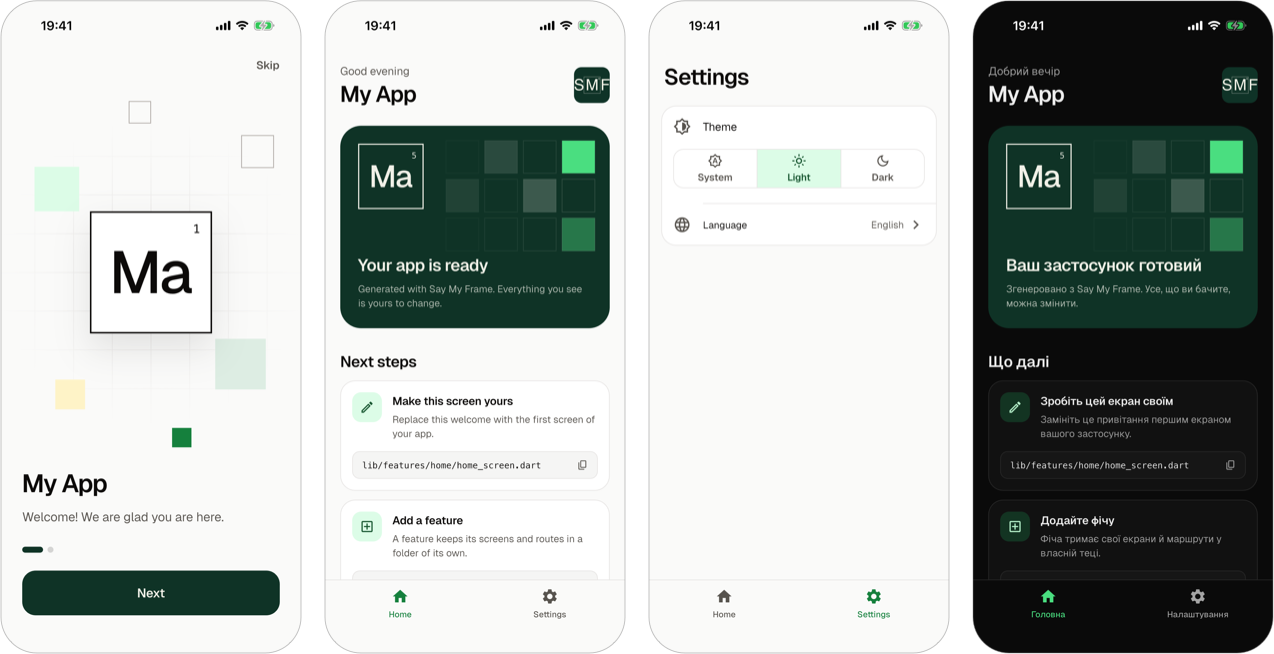
The home page of Say My Frame has a half-minute video of a walk through this app.
0.3 put the work into the module model, and the app it generated showed none of it: after smf create you saw one screen with the name of the app. 0.4 went into the app.
As before, what you get is a regular Flutter project. It has no SMF package in its dependencies, and SMF never touches it again.
What the Flutter starter app has after smf create
A Flutter onboarding screen on the first launch
The module onboarding adds two pages that a new user goes through once. Its buttons only finish the onboarding and navigate nowhere. The module declares a guard of the routes, and the router of the app shows the onboarding in place of every other screen until the user has finished it:
guards: [
  RouteGuard(
    name: 'firstRun',
    allows: FunctionRef('onboardingCompleted', import: _status),
    redirectTo: _route,
  ),
],
Here _status is the file with that function, and _route is the route of the onboarding itself. The module never mentions go_router. Guards are part of the router role, so another router would have to ask them the same way. The app remembers that the onboarding is finished, and onboardingStatus.restart() shows it again.
The pages are a list in lib/features/onboarding/onboarding_pages.dart, and you replace them with your own:
List<Widget> onboardingPages(BuildContext context) => [
  OnboardingPage(
    symbol: 'Ma',
    title: 'My App',
    text: context.l10n.onboardingWelcome,
  ),
  OnboardingPage(
    icon: Icons.check_rounded,
    title: context.l10n.onboardingReadyTitle,
    text: context.l10n.onboardingReady,
  ),
];
The page of the onboarding module has the rest, and guards of routes explains how a module keeps the user away from a screen.
A start screen written for the developer
In 0.3 the start screen of home showed the name of the app. Now it is a welcome for you, the developer. It names the app, greets you by the time of the day and lists three next steps. Each step has the path of a file, and a tap copies it. The first step is to replace this screen with the first screen of your app, and the page of the home module shows how.
A settings screen that the modules fill
The module settings adds a settings screen and knows nothing about what is on it. Modules and roles give it entries. In an app with a theme and a localization, the screen has the theme mode (light, dark or the one of the device) and the language.
Neither entry comes from the module that provides the theme or the texts. The theme mode belongs to the theme role and the language to the localization role, so a second theme module would get the same entry without writing it. In an app whose modules have no setting, the screen shows a note for the developer instead of an empty list.
A light and a dark Material 3 theme with a bundled font
material_theme generates lib/core/theme/app_theme.dart with a palette, text styles and the look of the components. That file is yours to edit, and the theme guide says what to change and where. The font files are in assets/fonts/geist/ with their license, so the app loads no font from the network and gets no package for it.
Flutter localization in two languages with gen-l10n
gen_l10n writes the texts of the modules into ARB files, one for each language, and flutter pub get generates the class that code reads them through. The modules come with texts in English and Ukrainian. --locales chooses the languages of the app. Until the user chooses one, the app follows the device.
The theme mode and the language are remembered between launches. shared_preferences keeps them, and it is meant only for settings that are no secret. Code changes them with one call each:
await appThemeMode.choose(ThemeMode.dark);
await appLocale.choose(const Locale('uk'));
The languages guide and the preferences guide have the details.
Large text, less motion and a screen reader
I did not want screens that look right only on my phone. The tests of the onboarding and of the start screen put them on a phone of 320 by 480 with the text at three times its size, in each language of the app, and fail when something overflows. The motion of these screens ends, and an app that asks for less motion shows them at once. Titles are headers for a screen reader, and each tab of the bar at the bottom is one button for it.
A guide for coding agents in every app
Every generated app has AGENTS.md and CLAUDE.md. The guide says where the files of each role are, how code of the app uses them and what code must not do. The roles and the modules of the app write its sections, so it describes this app and not SMF in general. There is an example in the coding agents guide.
Twelve roles and sixteen modules that still don't know each other
0.3 had eight roles and eleven modules. 0.4 has twelve roles and sixteen modules. The new roles are the preferences, the settings screen, the localization and the theme, and the new modules are onboarding, settings, material_theme, gen_l10n and shared_preferences.
The rule of 0.3 held: a module names roles and never another module. A feature shows its texts through the localization role, and in an app without it the same feature shows them in English. The screens read their colors from the theme of the app, whichever module provides it, and they work in an app with no theme module too.
CI checks this by running the apps. When I wrote this, it generated 32 apps from the modules of the CLI and ran flutter analyze and flutter test in each. It also starts apps on an Android emulator and on an iOS simulator. Tests of the roles run inside the generated apps. To show that these tests can fail, the repository keeps a provider with one planted bug for each role they cover, and CI checks that the tests fail on it. Module independence in the docs describes the rules.
What SMF 0.4 can't do yet
- There is no sign-in, no networking and no push notifications.
- SMF creates new apps. It still can't add a module to an app you already have.
- The texts of the modules are in English and Ukrainian. For another language of
--locales, the app shows them in English until you translate its ARB file. - Most roles have one provider: one router, one theme, one way to keep the texts.
- It generates Android and iOS apps for Flutter 3.44 or newer and Dart 3.12 or newer.
Where it's going
Sign-in is next on my list: email and password, and screens only for users who are signed in. The guards of routes that the onboarding uses were built with that in mind. Adding modules to an app that already exists is still on the list too. There are no dates. SMF is a side project, and I'd rather ship things when they work.
If you have a module in mind, tell me which one on Discord or in GitHub Issues.
Upgrading from 0.3
- No option of
smf createchanged or went away.--localesis new. homeis a welcome with next steps now, andbottom_tabsdraws its bar in the colors of the theme.- The module API of
smf_contractschanged in several places, so a module written for 0.3 needs an update. - Apps generated by 0.3 stay as they are. SMF generates an app once and never touches it again.
The full list is in the release notes of SMF 0.4.0 on GitHub.
Try the Flutter starter app
dart pub global activate smf_flutter_cli
smf create
SMF is tested on macOS, Linux and Windows. The documentation starts with installation and your first app, the tour of a generated app goes through its files, and the code is on GitHub. Stars there are welcome, but only if you actually like it.