6 min read
SMF 0.3: an open-source Flutter project generator built from independent modules
SMF 0.3 is a free Flutter project generator. CI checks its modules together: go_router, get_it, BLoC or Riverpod, and Firebase up to flutter build ipa.
By Yevhen Beshkarov
- release
Say My Frame (SMF) is a free, open-source Flutter project generator whose modules are checked together: its CI generates apps from many combinations of them and analyzes each one. It also sets up Firebase Crashlytics and Analytics all the way to flutter build ipa. You choose what the app needs, such as go_router, tabs at the bottom, get_it, and BLoC or Riverpod, and smf create generates a Flutter project in which these parts already work together. Version 0.3 is out on pub.dev. It does less than the word "generator" might promise, so this post is about what it does today, what it can't do yet, and where I want to take it.
dart pub global activate smf_flutter_cli
smf create my_app --org com.example -m home,bottom_tabs,get_it,bloc --no-input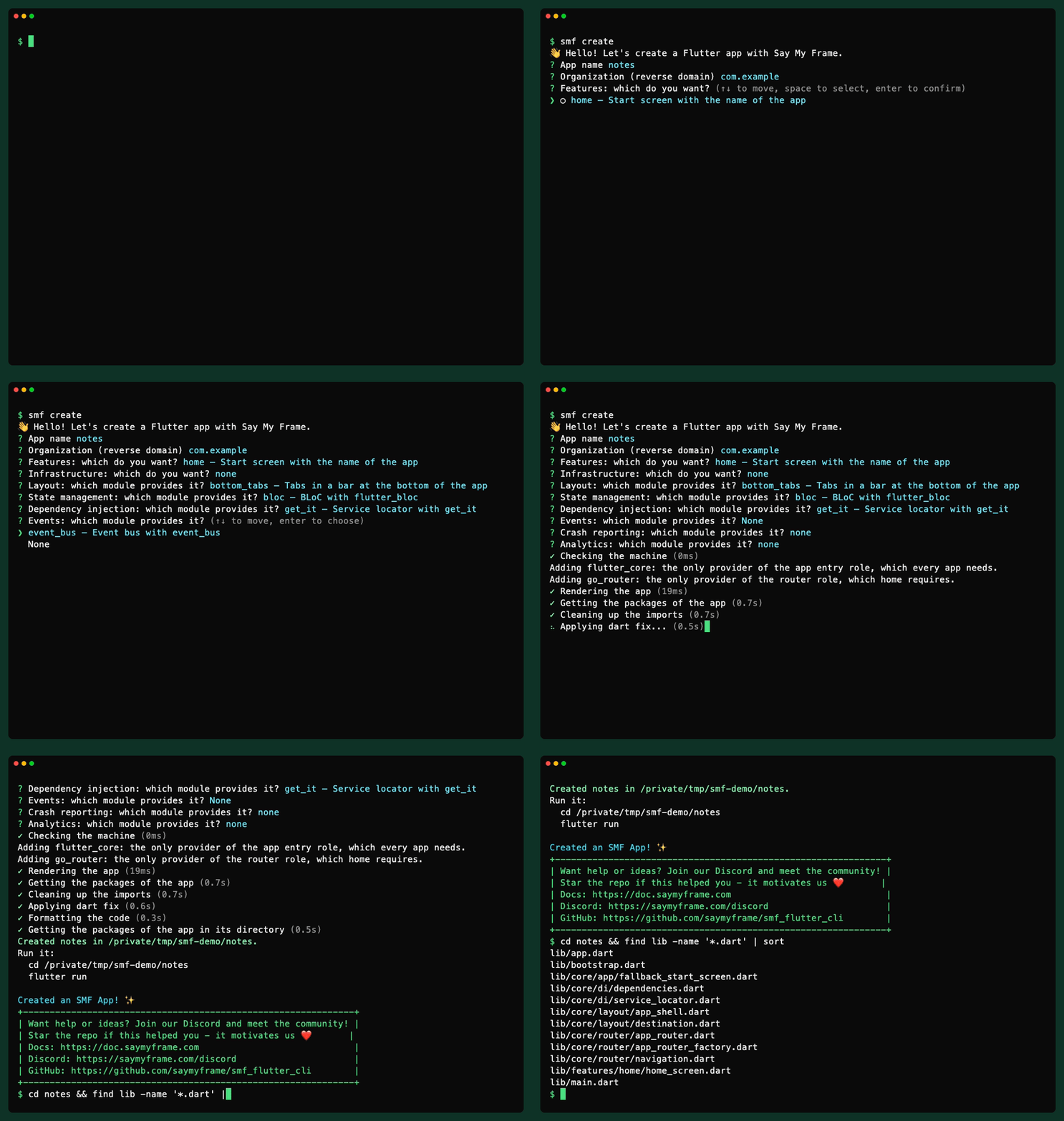
What you get is a regular Flutter project. It has no SMF package in its dependencies, and nothing in it has to be generated again, so the code is yours from the first commit.
Why SMF 0.3 is a rewrite
SMF 0.1 came out in August 2025, and 0.2 followed in September. Each module brought its own templates, and an engine patched the shared files. It worked for the combinations I had tried.
This September I ran the published 0.2 with Flutter 3.44. It reported success and generated apps that did not build. Some modules assumed go_router or get_it, and CI back then never generated an app or ran the analyzer, so nothing caught it.
0.3 starts from one rule: modules do not know each other.
What the Flutter project generator does today
Modules name roles, not other modules
The start screen needs a router, not go_router. The analytics module logs screen views when the app has a router, whichever router that is. SMF calls these shared parts roles, and there are eight of them: app entry, router, layout, state management, dependency injection, events, crash reporting and analytics. A role can have more than one provider. BLoC and Riverpod both provide state management.
Modules don't edit files either. Shared files, such as bootstrap.dart, have sockets: named places where modules put code without knowing who else puts code there. This is how firebase_analytics hands the router a listener of the screen, and only when the app has a router:
const SocketContribution.item(
  RouterRole.screenListeners,
  Fragment(
    'logFirebaseScreenView',
    imports: [
      ImportRef.app(
        'core/analytics/firebase_analytics_service.dart',
        show: ['logFirebaseScreenView'],
      ),
    ],
  ),
  when: {routerRole},
),
Before it writes a single file, smf create checks the rules. A module may put code only into the sockets of its own roles, of the app entry and of the modules it depends on, and every file of the app has exactly one owner. The tests of every module run the same checks. CI then generates apps from combinations of the modules, 18 of them for the modules of the CLI when I wrote this, runs flutter analyze on each one and runs tests in some of them. The module model and module independence pages of the docs go deeper.
Firebase Crashlytics and Analytics, set up all the way to flutter build ipa
Three modules bring Firebase: firebase_core, firebase_crashlytics and firebase_analytics. Before it generates anything, SMF checks the machine for the Firebase CLI, a Firebase login and the FlutterFire CLI. In a terminal it offers to set up what is missing, and asks first. After generation it offers to run flutterfire configure with the ids of the app.
Two details took longer than the rest. With a router, firebase_analytics logs one screen view for each screen the user sees, tab switches included. And on macOS, SMF fixes the Crashlytics build phase that flutterfire_cli 1.4.1 adds, because flutter build ipa fails in that phase when the app uses Swift Package Manager. That story gets a post of its own. Until then, the Firebase guide has the details.
A Flutter app with go_router, tabs, get_it and BLoC or Riverpod
With -m home,bottom_tabs,get_it,event_bus, SMF adds two more modules and tells you why:
Adding flutter_core: the only provider of the app entry role, which every app needs.
Adding go_router: the only provider of the router role, which home requires.
Screens navigate with context.nav.home.home().go(), which doesn't mention go_router. Code that needs a service asks the ServiceLocator of the DI role, which doesn't mention get_it. With bottom_tabs, the destinations of the features become tabs of a NavigationBar, and each tab keeps its own stack. bootstrap() runs the start-up code of the modules in four phases before the first frame. The Android and iOS projects are the ones flutter create writes in Flutter 3.44.
The tour of a generated app goes file by file and names the module that wrote each one.
A plan before anything is written
--explain prints what would be generated and stops. It lists the modules and why each is there, the roles, the dependencies, the commands that would run after generation and the state of the machine:
Modules
  home: requested
  bottom_tabs: requested
  get_it: requested
  event_bus: requested
  flutter_core: the only provider of the app entry role, which every app needs
  go_router: the only provider of the router role, which home requires

Roles
  Layout: bottom_tabs
  Dependency injection: get_it
  Events: event_bus
  App entry: flutter_core
  Router: go_router
For scripts and CI there are --no-input, --skip-external-setup, --strict and exit codes: 0, 1, 64, 70 and 130. SMF renders the app in memory and finishes it in a temporary directory, so a run that fails or that you cancel leaves no half-made app in your project. The reference of smf create lists every option.
Modules of your own
Modules are Dart packages built on smf_contracts, and yours follow the same rules as the built-in ones. The contract harness in smf_pipeline generates in memory every app that matters for your module and checks it. To generate apps with your module, you write a small command of your own with runCli and smfModules. Extending SMF shows how, and one of its pages builds a counter feature with BLoC and Riverpod variants from start to end.
What SMF 0.3 can't do yet
- The app you get is a skeleton. There is one feature module,
home, a start screen with the name of the app. The tab bar stays hidden until a second screen is a destination, so aftersmf createyou see one screen. - There are no modules for sign-in, networking, localization or theming. The list has eleven modules, and I wanted the foundation to hold before adding more.
- SMF creates new apps. It can't add a module to an app you already have.
- It generates Android and iOS apps for Flutter 3.44 or newer and Dart 3.12 or newer.
flutterfire configureneeds you at the keyboard to log in and pick a Firebase project. In CI, SMF leaves it for later and prints the command.
Where it's going
Two things are next on my list: modules with real screens, and a way to add modules to an app that already exists. There are no dates. SMF is a side project, and I'd rather ship things when they work.
If you have a module in mind, tell me which one on Discord or in GitHub Issues.
Upgrading from 0.2
- The state manager is a module now:
-m blocor-m riverpodinstead of-s. --startreplaces-rand--route.--strictand--on-conflictare options ofcreatenow, so they go after it:smf create my_app --strict.- Tabs at the bottom are a module of their own,
bottom_tabs. - The module API of
smf_contractsis new, so modules written for 0.2 need a rewrite. - Apps generated by 0.2 stay as they are. SMF generates an app once and never touches it again.
The same list, with what's new in 0.3, is in the release notes of SMF 0.3.0 on GitHub.
Try the Flutter project generator
dart pub global activate smf_flutter_cli
smf create
SMF is tested on macOS, Linux and Windows. The documentation starts with installation and your first app, the Say My Frame site shows the roles and modules at a glance, and the code is on GitHub. Stars there are welcome, but only if you actually like it.